Integrating AI in Canvas Quiz Creation

Redesigned the Canvas quiz creation flow, introducing autosave, AI quiz generation, and progress indicators.

Research and prototyping led to 62% faster task completion and 30% fewer clicks.
Tools
Figma, Adobe Illustrator, Adobe
Team
4 Member Design Team
Time
2.5 months
Tools
Figma, Adobe Illustrator, Miro
Team
4 Member Design Team
Time
2.5 months
Tools
Figma, Miro, Adobe Illustrator
Team
4 Member Design Team
Time
2.5 months
Tools
Figma, Adobe Illustrator, Adobe
Team
4 Member Design Team
Time
2.5 months
Time on Task62%↓ Reduced
Click Count30%↓ Reduced

Identifying the Gaps

We interviewed 8+ educators and faculty to identify key issues. We then validated and explored these issues through observation interviews, measuring: time on task, click count, and user satisfaction.

Interviews
8+Educators & Faculty
We spoke with educators and faculty to identify pain points.
⚠️Key Issues
  • Worrying regarding saved progress
  • Constant Repetition
  • Mentally demanding
📊Baseline Metrics
  • Time on Task
  • Click Count
  • Error Rate
  • Task Completion Rate

Problems Identified

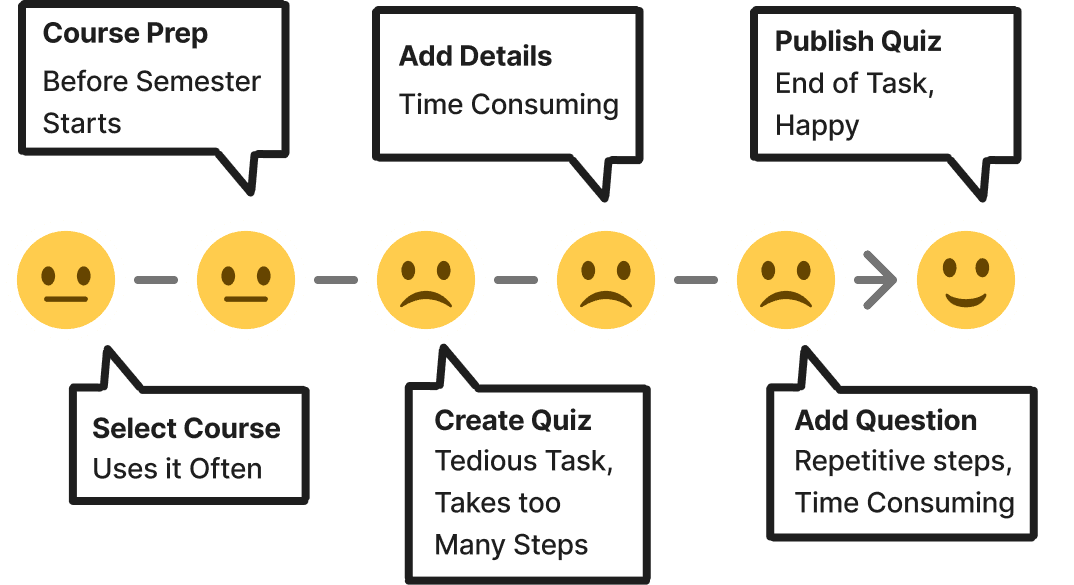
Creating quizzes in Canvas for faculty is inefficient, confusing, and requires excessive time due to:

  • Lack of progress visibility

  • Redundant manual actions

  • Poor feedback mechanisms

User Journey while using Quiz creation on Canvas

"The system hasn’t been updated in years. There is the general feeling that the world has passed it by."

- Professor, Teaching Faculty

Our Challenge

Streamline the quiz creation process by:

  1. Reducing time spent doing repetitive tasks such as; manually entering similar question types, adding settings for each question, saving repeatedly and,

  2. Enhancing the overall experience for educators using Canvas.

Brainstorming Concepts

We conducted Low, Mid and High fidelity testing with faculty and measured the same metrics across testing to evaluate impact. These sessions provided tangible insights, allowing us to iterate and refine the experience based on faculty behavior and feedback.

Transition of design concept from Low to high fidelity

Transition of design concept from Low to high fidelity

How We Solved It

Through our iterative process, we developed solutions in the user flow and interface to address the pain points faced by professors.

Following are the 3 solutions:

1

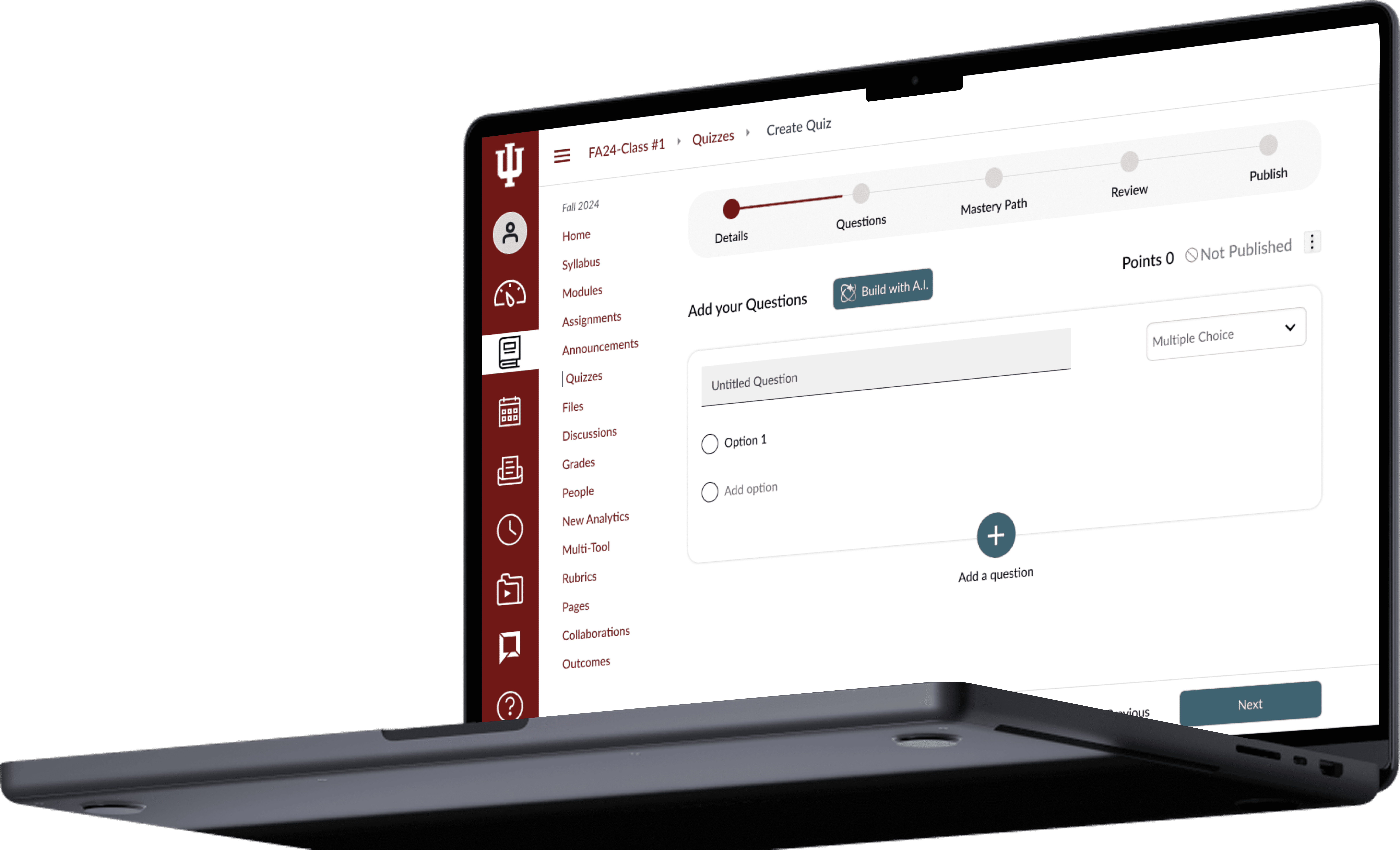
Integrating AI

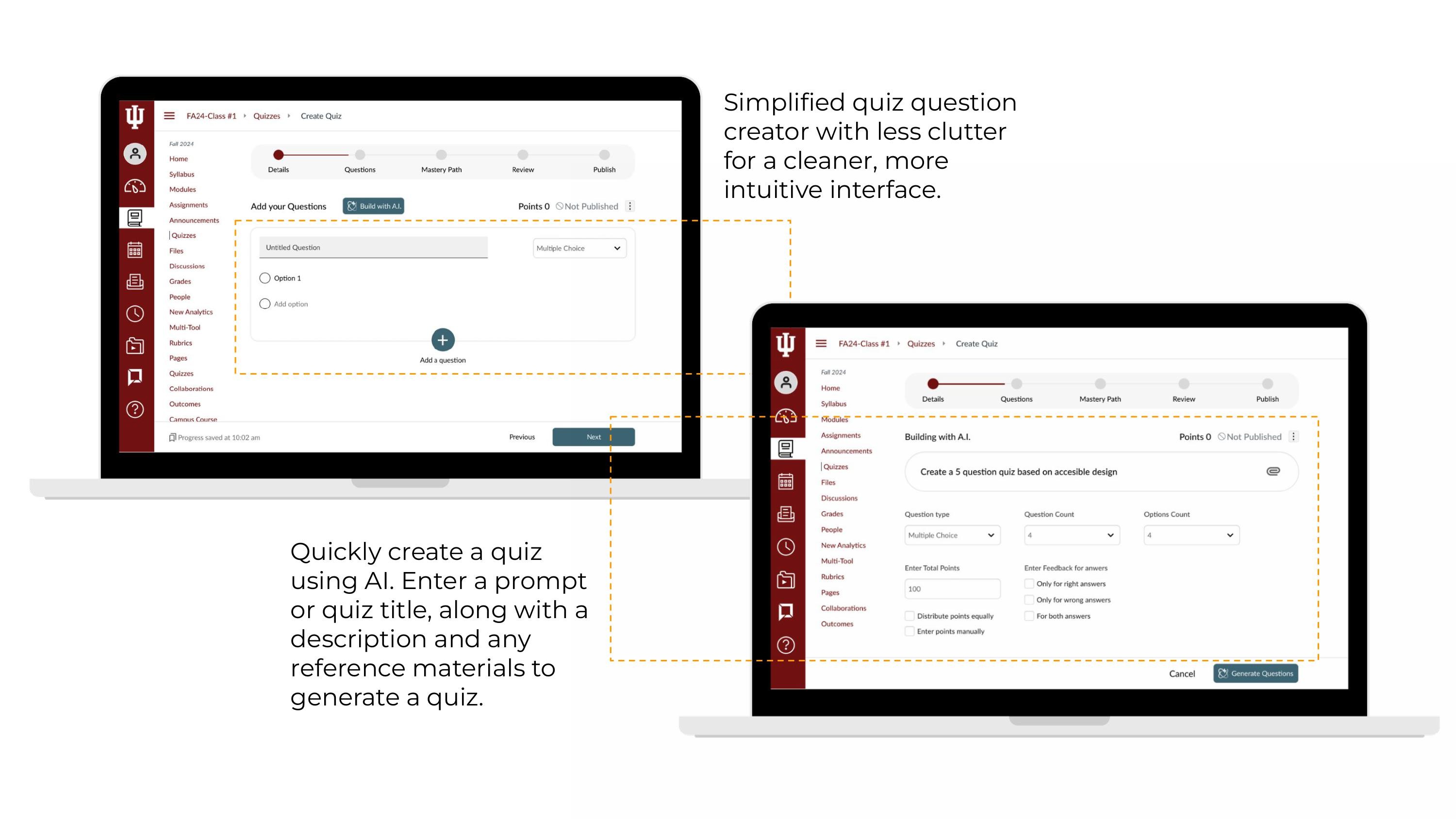
AI-powered quiz generation from topic prompts, with editable suggestions to speed creation while reducing cognitive load.

2

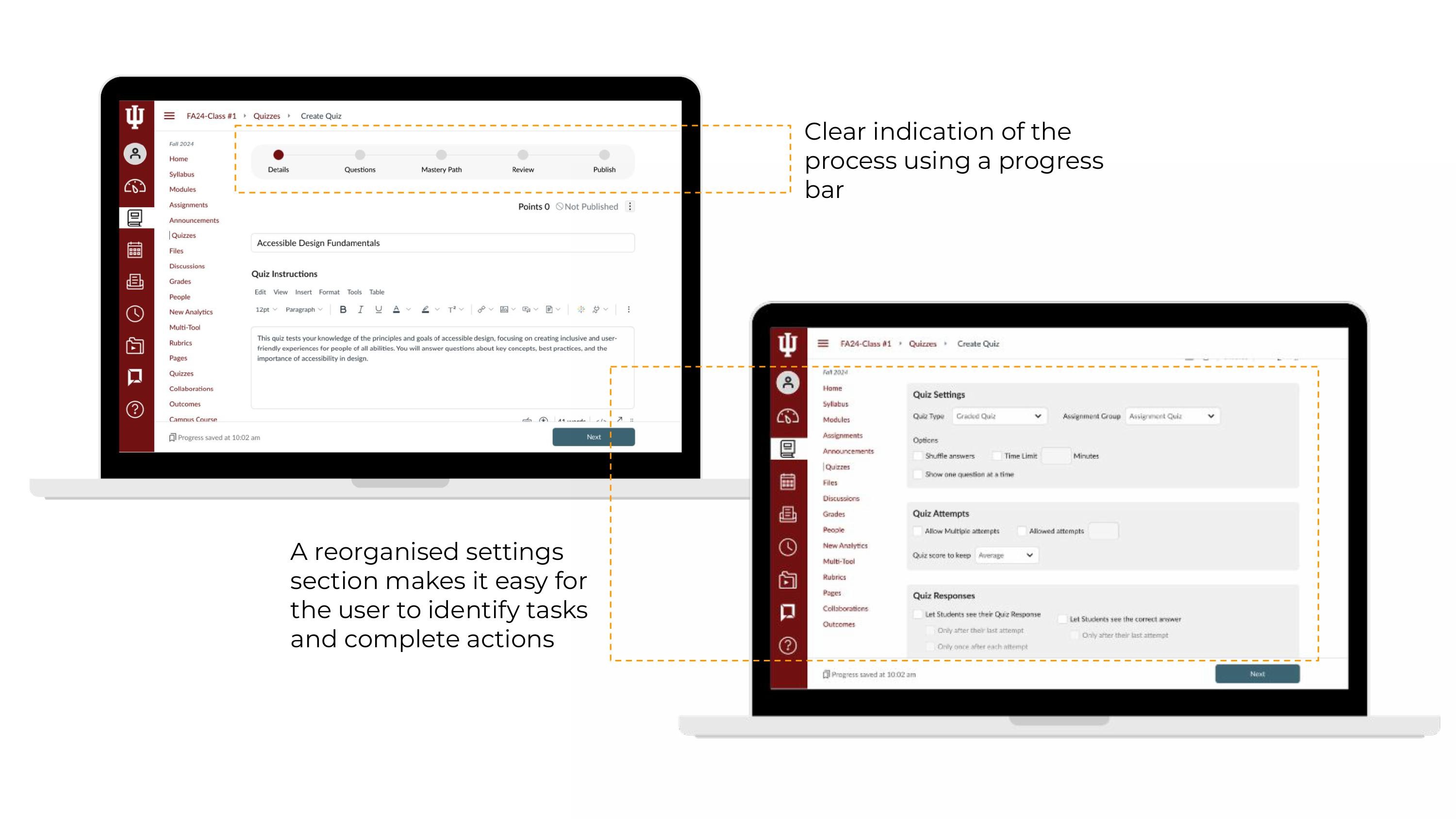
Adding a Progress Bar

A progress indicator enhances user experience by providing real-time feedback on task completion, reducing uncertainty, and keeping users engaged.

3

Easy Access to Quiz Creation

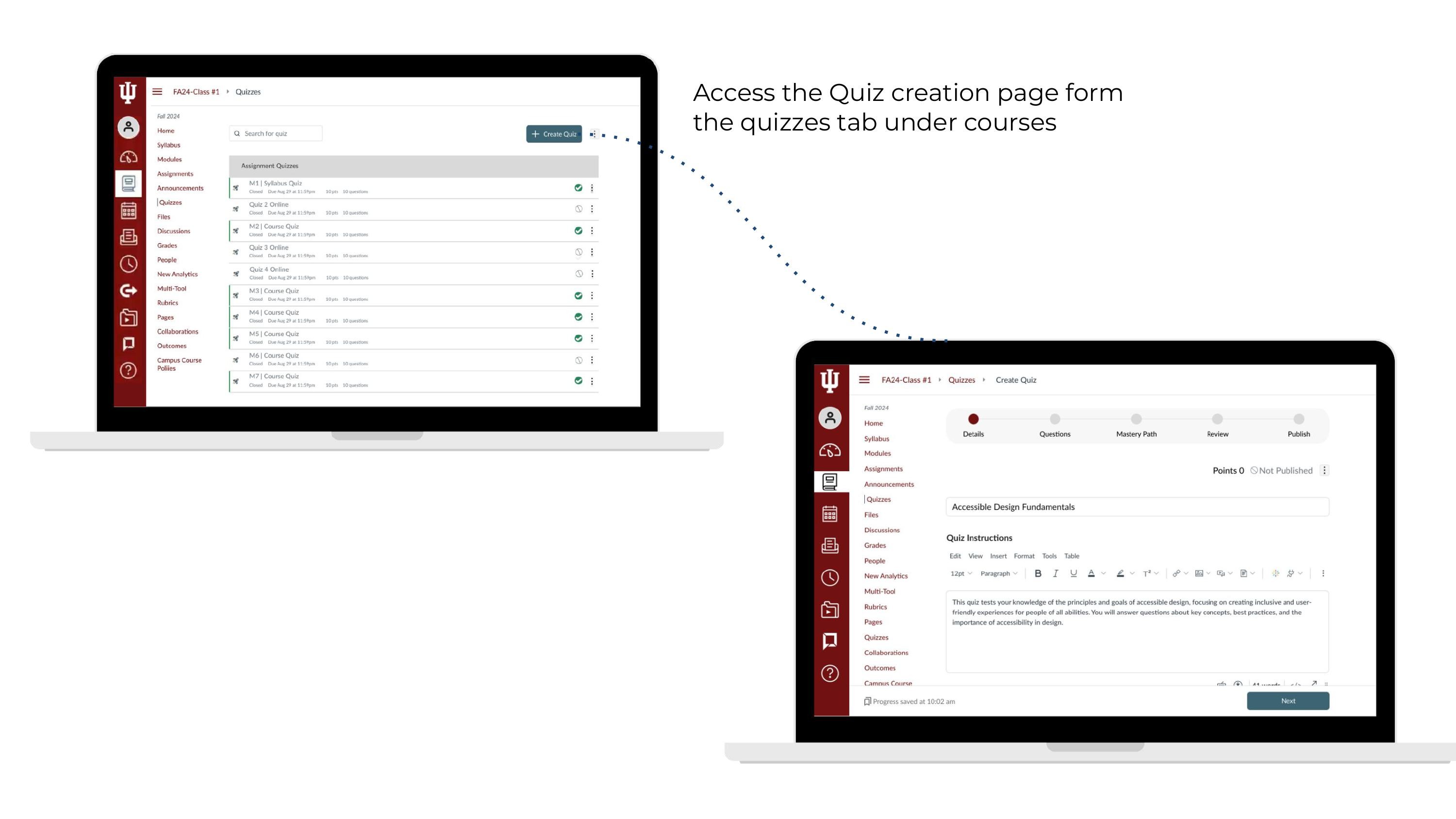
Streamlined navigation by allowing faculty to access quiz creation directly from the course tab, reducing steps and saving time.

1

Integrating AI

AI-powered quiz generation from topic prompts, with editable suggestions to speed creation while reducing cognitive load.

2

Adding a Progress Bar

A progress indicator enhances user experience by providing real-time feedback on task completion, reducing uncertainty, and keeping users engaged.

3

Easy Access to Quiz Creation

Streamlined navigation by allowing faculty to access quiz creation directly from the course tab, reducing steps and saving time.

1

Integrating AI

AI-powered quiz generation from topic prompts, with editable suggestions to speed creation while reducing cognitive load.

2

Adding a Progress Bar

A progress indicator enhances user experience by providing real-time feedback on task completion, reducing uncertainty, and keeping users engaged.

3

Easy Access to Quiz Creation

Streamlined navigation by allowing faculty to access quiz creation directly from the course tab, reducing steps and saving time.

1) Integrating AI in the Quiz Creation Process

How can AI speed up Quiz Creation and Repetition?

Through primary and secondary research, we evaluated the impact of AI on quiz creation. Studies showed educators completed quizzes in under 10 minutes and reported higher confidence using AI. Our faculty surveys highlighted strong interest in automating repetitive tasks.

Feedback from low and mid fidelity testing confirmed that “Build with AI” directly addressed key pain points like cognitive load, time constraints, and creative fatigue. Here are some Faculty quotes:
1

AI could reduce manual typing by automating quiz creation.

“If I can use JavaScript, I only need to write a few lines of code to generate the entire table for the entire semester... Now I have to manually type it."

2

AI helps reduce pre-semester workload by automating quiz setup

“That’s usually the biggest time, I think, a couple of weeks before the semester starts. Then for the rest of the semester, Canvas goes mostly just regular activities every week. “

3

AI simplifies quiz set up by automating repetitive steps

“There are so many things I have to specity, I have to type everything”

1

AI could reduce manual typing by automating quiz creation.

“If I can use JavaScript, I only need to write a few lines of code to generate the entire table for the entire semester... Now I have to manually type it."

2

AI helps reduce pre-semester workload by automating quiz setup

“That’s usually the biggest time, I think, a couple of weeks before the semester starts. Then for the rest of the semester, Canvas goes mostly just regular activities every week. “

3

AI simplifies quiz set up by automating repetitive steps

“There are so many things I have to specity, I have to type everything”

1

AI could reduce manual typing by automating quiz creation.

“If I can use JavaScript, I only need to write a few lines of code to generate the entire table for the entire semester... Now I have to manually type it."

2

AI helps reduce pre-semester workload by automating quiz setup

“That’s usually the biggest time, I think, a couple of weeks before the semester starts. Then for the rest of the semester, Canvas goes mostly just regular activities every week. “

3

AI simplifies quiz set up by automating repetitive steps

“There are so many things I have to specity, I have to type everything”

2) Including the Progress Bar

3) Reduce Steps and Time
Testing

We compared our baseline metrics to our metrics collected after high fidelity testing. The redesign led to a 62% reduction in time on task and 30% fewer clicks during quiz setup.

Baseline Metrics

Metrics on High Fi Testing

Key Takeaways

This project highlighted the power of thoughtful, user-centered design. By testing across fidelity levels and measuring performance consistently, we were able to make clear, data-backed improvements, reducing time on task by 62% and simplifying interactions by 30%.

We also learned that AI can be genuinely useful when it’s introduced with care. Faculty responded positively to assistive features like “Build with AI” because they felt optional, editable, and intuitive, not intrusive.

Most importantly, we saw how small changes, autosave, visual hierarchy, and progress indicators, can dramatically reduce cognitive load. Designing for clarity, control, and trust led to a tool that not only worked better, but felt better to use.
Thank You!

Create a free website with Framer, the website builder loved by startups, designers and agencies.